Lost Colony Structures Skin: Skin: What It Is, How to Get It and What It Does
## Introduction to the Lost Colony Aesthetic The Lost Colony Structures Skin is a specialized cosmetic item introduced in version 77.0 as part of the Lost Co
Introduction to the Lost Colony Aesthetic
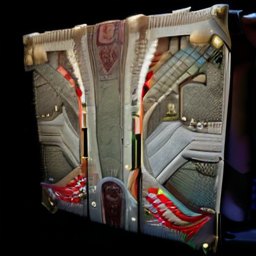
The Lost Colony Structures Skin is a specialized cosmetic item introduced in version 77.0 as part of the Lost Colony DLC. This skin allows players to transform the visual appearance of numerous structures within the game into the distinct style of the Lost Colony maps. Unlike many other skins that require specific resource tiers to apply, this particular skin has no resource tier restriction, making it accessible for use on almost any constructed building regardless of its construction level. To equip and utilize this skin, the Lost Colony DLC must be purchased and active on the server or local instance.
Accessing and Applying the Skin
Obtaining the Lost Colony Structures Skin is straightforward for players who have acquired the necessary DLC. Once the expansion is purchased, the skin becomes available immediately in the cosmetics tab of your inventory. From there, you can add it to your hotbar for quick access during gameplay. To apply the skin, simply select the item from your inventory or hotbar and place it over the structures you wish to modify. The application process is seamless, instantly altering the texture and visual model of the selected building components to match the Lost Colony theme.
Customizing Structure Modes
One of the most powerful features of this skin is its versatility, offering multiple modes that can be switched on the fly. Players can cycle through these different modes by using the forward slash key (/). This functionality is crucial for maintaining a consistent aesthetic across a base while still utilizing different structural types. The skin supports a wide variety of components, including Foundations in Standard, Quarter, Triangle, and Quarter Triangle configurations. Walls can be applied in Standard, Quarter, Large, and Windowframe styles, while Doorways offer Standard, Short, Double, and Secret variations. Doors are equally comprehensive, covering Standard, Cellar, Large Cellar, Hangar, Large Hangar, Barn, and Large Barn types.
Detailed Component Compatibility
Beyond the primary building blocks, the skin covers almost every aspect of Lost Colony architecture. It includes textures for Windows, Ceilings (Standard and Quarter), and Hatch Frames and Trapdoors. Structural elements like Railings, Pillars (Standard, Half, Thin, and Thin Half), and Beams (Standard, Half, Thin, and Thin Half) are fully supported. The skin also extends to Sloped Walls in Standard and Shallow variants, as well as Roofs in Standard, Quarter, Triangle, and Corner styles. For movement and access, Ramps (Standard, Quarter, and Corners), Stairs (Standard and Quarter), Staircases, Ladders, and Gates and Gateways (Standard and Behemoth) all receive the Lost Colony treatment. Additionally, Fence Foundations and Fence Supports are compatible, ensuring that perimeter defenses match the main structure.
Furniture and Utility Integration
The skin's scope extends beyond just the main walls and roofs to include functional furniture and utility items. Lost Colony Seats are fully supported, allowing players to style their seating areas to match the theme. The Lost Colony Storage category includes various storage units that can be skinned. Furthermore, signage can be customized with the Lost Colony Sign skin, which covers Standard Signs, Wall-Mounted Signs, and Billboards. This ensures that even small details like nameplates and information boards contribute to the immersive atmosphere of the Lost Colony aesthetic. A unique feature of this skin is its audio capability; it provides unique opening and closing sounds for structures that feature these animations, enhancing the auditory experience of the base.
Incompatible Structures and Limitations
Despite its extensive compatibility list, there are specific structures that cannot be skinned with the Lost Colony Structures Skin. Players should avoid attempting to apply this skin to Water Intakes and Taps, as these will not transform. Similarly, Tree Platforms and Cliff Platforms are incompatible with this skin. There are other unspecified structures that also fall into this category of incompatibility. It is important for builders to plan their base layout carefully, ensuring that these specific utility structures are either hidden or accepted as exceptions to the unified aesthetic, rather than wasting the skin on them.
Frequently asked questions
What does Lost Colony Structures Skin eat?
One of the most powerful features of this skin is its versatility, offering multiple modes that can be switched on the fly. For movement and access, Ramps (Standard, Quarter, and Corners), Stairs (Standard and Quarter), Staircases, Ladders, and Gates and Gateways (Standard and Behemoth) all receive the Lost Colony treatment.
Where does Lost Colony Structures Skin spawn?
This skin allows players to transform the visual appearance of numerous structures within the game into the distinct style of the Lost Colony maps.
What is Lost Colony Structures Skin used for?
Unlike many other skins that require specific resource tiers to apply, this particular skin has no resource tier restriction, making it accessible for use on almost any constructed building regardless of its construction level. A unique feature of this skin is its audio capability; it provides unique opening and closing sounds for structures that feature these animations,...
Play on AncientARK
Join our ARK: Survival Ascended servers and put this guide into practice.
See the store