Paintbrush: Tool: What It Is, How to Get It and What It Does
## Overview and Crafting Requirements The Paintbrush is a fundamental tool in ARK: Survival Evolved, introduced at the required level of 9. It falls under th
Overview and Crafting Requirements
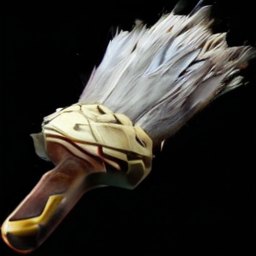
The Paintbrush is a fundamental tool in ARK: Survival Evolved, introduced at the required level of 9. It falls under the Tools category and weighs a lightweight 0.5 units. Unlike many other items, it is not a single-use item; instead, it has a durability limit of 120 minutes before decomposing. Players can find this tool in Green Beacons or craft it directly in their inventory. The crafting recipe requires specific ingredients: 1 unit of Wood or Fungal Wood, 3 units of Hide, and 10 units of Thatch. Once crafted, the item ID is 38, and it grants 0.7 crafting experience points upon creation.
Preparation and Dye Loading
To utilize the Paintbrush effectively, players must first acquire Dyes. The process begins by dragging the desired dye onto the Paintbrush within the inventory screen. This action loads the brush with a specific color. The tool contains exactly 10 charges of the selected color. This capacity allows a player to paint more than one structure part or apply multiple colors sequentially without needing to recraft the tool. If the brush runs out of dye, it does not break permanently; players can simply add more dye to it to repair and reload its capacity.
Painting Structures and Regions
When painting structures, the Paintbrush offers significant control over the application of color. Players can select the specific region of a structure they wish to color, allowing for precise detailing. This feature is particularly useful for customizing bases or creating artistic designs on walls and floors. However, it is important to note that not all entities support region selection. Creatures, other players, and certain objects do not have defined paint regions. Instead, these targets allow for free-hand doodling, enabling players to draw freely on their skin or the surfaces of creatures and players.
Doodling and Custom Creations
The free-hand capability of the Paintbrush extends beyond simple coloring. Players can create custom doodles on creatures, themselves, and other players. These doodles are not just temporary decorations; they can be saved using the save option located on the top of the painting interface, available on almost any object that supports free-hand ability, such as the Painting Canvas. Saved doodles can be loaded later, allowing for consistency in design. In the context of PvP servers, these custom drawings serve a strategic social purpose. Players can use them to convey messages, such as begging for mercy or convincing others not to harm them, adding a layer of communication to gameplay.
Efficiency and Alternatives
While the Paintbrush is versatile, it is not always the most efficient tool for large-scale painting tasks. The text notes that if players are able to craft one, the Spray Painter is a superior alternative for painting structures. The Spray Painter is described as being much faster than the standard Paintbrush and is more sparing in its use of dye. For players focused on speed and resource conservation when covering large surface areas, upgrading to the Spray Painter is recommended over relying solely on the standard brush.
Maintenance and Changelog Updates
Over the game's history, the Paintbrush has received updates to enhance its functionality. In patch 220.1, the ability to paint oneself was expanded, allowing players to drag a dyed Paintbrush directly onto their Character preview in the inventory to apply color. Later, in patch 259.0, an alternative fire key was added. This Alt-Fire function specifically enables the "Paint Yourself" action, streamlining the process of personal customization without needing to drag the item from the inventory. Players should monitor their durability closely, as the tool degrades when dye is depleted, though this is easily resolved by adding more dye.
Frequently asked questions
Overview and Crafting Requirements?
The Paintbrush is a fundamental tool in ARK: Survival Evolved, introduced at the required level of 9. It falls under the Tools category and weighs a lightweight 0.5 units.
Preparation and Dye Loading?
To utilize the Paintbrush effectively, players must first acquire Dyes. The process begins by dragging the desired dye onto the Paintbrush within the inventory screen.
Painting Structures and Regions?
When painting structures, the Paintbrush offers significant control over the application of color. Players can select the specific region of a structure they wish to color, allowing for precise detailing.
Doodling and Custom Creations?
The free-hand capability of the Paintbrush extends beyond simple coloring. Players can create custom doodles on creatures, themselves, and other players.
Efficiency and Alternatives?
While the Paintbrush is versatile, it is not always the most efficient tool for large-scale painting tasks. The text notes that if players are able to craft one, the Spray Painter is a superior alternative for painting structures.
Maintenance and Changelog Updates?
Over the game's history, the Paintbrush has received updates to enhance its functionality. In patch 220.1, the ability to paint oneself was expanded, allowing players to drag a dyed Paintbrush directly onto their Character preview in the inventory to apply color.
Play on AncientARK
Join our ARK: Survival Ascended servers and put this guide into practice.
See the store