Scout Remote: Remote Control Guide
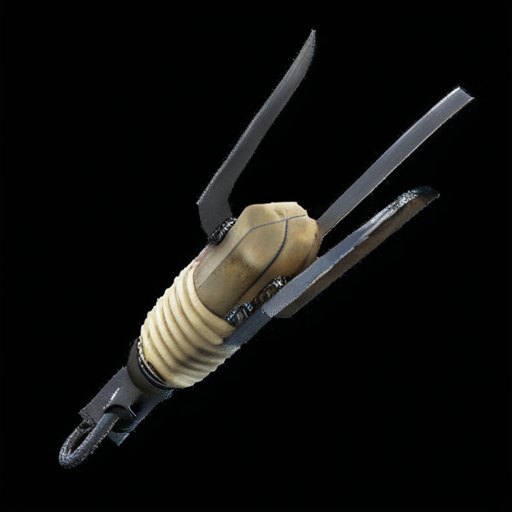
## Introduction to the Scout Remote The Scout Remote is a specialized Remote Control weapon introduced in the Extinction DLC for ARK: Survival Evolved. It se
Introduction to the Scout Remote
The Scout Remote is a specialized Remote Control weapon introduced in the Extinction DLC for ARK: Survival Evolved. It serves as a critical utility tool for players who need to gather intelligence or scout dangerous areas without exposing themselves. Unlike traditional weapons that deal damage, this item functions purely as a deployment mechanism for a drone. It is crafted at a City Terminal or a Tek Replicator and requires the player to possess at least one of the following resources: Element Dust or Red Element Dust. The crafting process is resource-intensive, demanding 5 Electronics, 30 Crystal or Primal Crystal, and 20 Metal Ingots or Scrap Metal Ingots. Once crafted, the item has a weight of 0.5 and a stack size of 1, making it relatively easy to carry in the inventory despite its high material cost.
Deployment and Activation Mechanics
To utilize the Scout Remote, the player must hold the item and press the designated deployment key while looking at an open area. It is highly recommended to deploy the device in an open space to ensure optimal visibility and functionality. Upon activation, the system consumes 20 units of ammunition, which is the specific activation cost for this device. After a brief delay, the remote control binoculars appear in the survivor's hand, and a drone is summoned. The player gains direct control over this drone, allowing them to navigate the environment from a first-person perspective within the binoculars interface. The drone can be returned to the main inventory by pressing the dismount key or by waiting for the cooldown period to expire naturally.
Operational Features and Utilities
While the primary function of the Scout Remote is reconnaissance, it offers several tactical advantages during operation. One notable feature is the ability to toggle a thermal view by pressing the "C" key, which can be invaluable for spotting enemies or resources through foliage or in low-light conditions. Furthermore, the drone possesses unique combat capabilities. Left-clicking on dinosaurs or players while controlling the drone issues a command to nearby tamed creatures to attack the targeted entity. Additionally, the drone itself can heal the player at a quick rate, providing a layer of emergency medical support while scouting. These features make the Scout Remote a versatile tool for both exploration and combat support.
Crafting Requirements and Locations
Crafting the Scout Remote is a significant undertaking due to the specific ingredients and locations required. Players must craft this item at either a City Terminal or a Tek Replicator. The recipe requires a combination of elemental resources and advanced technology parts. Specifically, the player needs 20 units of Element Dust or Red Element Dust as the primary component. This must be paired with 5 Electronics, which are essential for the remote's circuitry. The structural integrity of the remote relies on 30 units of Crystal or Primal Crystal, and the outer casing requires 20 Metal Ingots or Scrap Metal Ingots. This high tier of crafting requirements indicates that the Scout Remote is intended for late-game scenarios where players have access to high-level crafting stations and abundant resources.
Usage Constraints and Console Limitations
There are specific limitations and risks associated with using the Scout Remote, particularly on console platforms. Players using console versions of the game should avoid deploying the remote if they currently have a shoulder mount equipped. If a player deploys the remote under these conditions, they will be unable to exit the scout remote using the standard "Dismount" command. This can leave the player trapped in the binocular view, potentially making them vulnerable to attacks or unable to interact with the environment. If a player finds themselves stuck in this situation, the recommended solution is to fly the drone out of range to force a reset or disconnect the link. This limitation highlights the importance of managing inventory and mount status before deploying advanced utilities.
Historical Context and Item Evolution
The Scout Remote has a distinct place in the evolution of ARK's item design. Interestingly, the binoculars used for this remote control mechanism were later separated and added as their own standalone item in the Genesis: Part 1 expansion. These items are known as Electronic Binoculars. While they share a visual similarity with the binoculars used for the Scout Remote, they possess different functions and are not interchangeable with the original remote system. This indicates that the technology behind remote viewing was modularized in later updates, allowing players to access similar reconnaissance tools through different means. The Scout Remote itself was first added in patch 285.104 and received mesh memory optimizations in patch 289.100 to improve performance.
Frequently asked questions
How do you tame Scout Remote?
Left-clicking on dinosaurs or players while controlling the drone issues a command to nearby tamed creatures to attack the targeted entity.
What does Scout Remote eat?
One notable feature is the ability to toggle a thermal view by pressing the "C" key, which can be invaluable for spotting enemies or resources through foliage or in low-light conditions. Left-clicking on dinosaurs or players while controlling the drone issues a command to nearby tamed creatures to attack the targeted entity.
What is Scout Remote used for?
Interestingly, the binoculars used for this remote control mechanism were later separated and added as their own standalone item in the Genesis: Part 1 expansion. While they share a visual similarity with the binoculars used for the Scout Remote, they possess different functions and are not interchangeable with the original remote system.
Play on AncientARK
Join our ARK: Survival Ascended servers and put this guide into practice.
See the store