Spray Painter: Tool Guide
| Paint Region | PC Key | PS4 Button | Xbox Button | | :--- | :--- | :--- | :--- | | 1 | Alt + 1 | R2 + 1 | RT + 1 | | 2 | Alt + 2 | R2 + 2 | RT + 2 | | 3 |
Introduction to the Spray Painter Tool
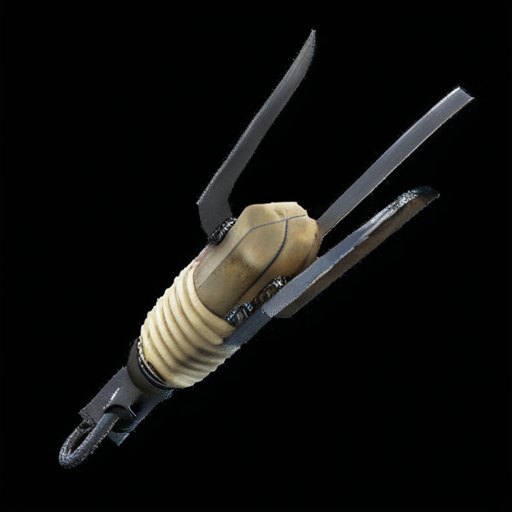
The Spray Painter is a specialized tool introduced in ARK: Survival Evolved via patch 202.0, designed specifically for the aesthetic customization of player structures. Unlike traditional methods that require immense amounts of dye, this tool allows users to apply color to structures with significantly less resource consumption. It is categorized under Tools and requires a player to reach Level 53 to unlock its crafting recipe. The item has a base durability of 100.0 and weighs 0.5 units. While it possesses a melee damage value of 10.0, its primary function is strictly cosmetic application rather than combat utility.
Crafting Requirements and Recipes
To craft the Spray Painter, players must utilize a Fabricator or a Tek Replicator. The recipe is complex and demands specific quantities of high-tier resources. The core components include 50 units of Metal Ingots or Scrap Metal Ingots, 35 units of Polymers, Organic Polymers, or Corrupted Nodules, and 40 units of Crystals or Primal Crystals. Additionally, the craft requires 60 units of Cementing Paste or Achatina Paste, 20 units of Oil or Oil from the Tusoteuthis, and 5 units of Hide. An Exo-Mek can also craft this item. Completing this recipe grants the player 231.75 points of Crafting XP. The tool consumes 20pxDye as ammunition and is available as a GFI item with the code "SprayPaint".
Operation and Dye Application
Using the Spray Painter involves a specific workflow to ensure precise application. First, the user must drag the desired dye onto the tool to set the active color. Once loaded, the player holds the fire button and drags the crosshair over the individual pieces of a structure to paint them. A visual indicator, a grey bar located underneath the Spray Painter in the inventory, displays the remaining amount of dye. As the player sprays, the dye is slowly expended. If the dye runs out, the tool can be instantly refilled with the same color by pressing the melee button, provided the dye is still in the inventory.
Configuring Paint Regions
One of the tool's most advanced features is the ability to toggle specific regions of a structure's texture to be either "Enabled" or "Disabled" for painting. This allows for complex color schemes without needing to paint every single part. To activate these regions, players must hold Alt Fire combined with a specific Hotkey Number (1 through 6). The mapping varies by platform. On PC, this involves Alt Fire plus keys 1-6. On PS4, the combination is R2 plus keys 1-6. On Xbox, it is RT plus keys 1-6. Notably, region 5 and 6 require holding two keys (e.g., ++ on PC) instead of a single key.
Unique Features and Limitations
The Spray Painter offers several distinct advantages and constraints compared to other painting methods. It can be operated while the player is mounted on a creature, allowing for efficient painting of large bases without dismounting. Furthermore, as of patch 264.5, the tool can be used underwater, expanding its utility for aquatic bases. However, the tool has strict limitations. It cannot be used to paint creatures, other players, or the player themselves (Warpaint). Additionally, the tool does not allow the selection of separated parts of a painted area; it treats the structure as a whole regarding region toggling. The tool also resets its region settings whenever the player switches to a different tool or dismounts a creature.
Platform-Specific Controls
For console users, the interface for managing paint regions is adapted to controller inputs. The table below outlines the exact button combinations required to toggle the six available paint regions. These controls are dynamic and appear on the gamepad interface.
| Paint Region | PC Key | PS4 Button | Xbox Button |
|---|---|---|---|
| 1 | Alt + 1 | R2 + 1 | RT + 1 |
| 2 | Alt + 2 | R2 + 2 | RT + 2 |
| 3 | Alt + 3 | R2 + 3 | RT + 3 |
| 4 | Alt + 4 | R2 + 4 | RT + 4 |
| 5 | Alt + 5 | R2 + X | RT + X |
| 6 | Alt + 6 | R2 + Y | RT + Y |
Players should note that for regions 5 and 6, the secondary button (X on PS4, Y on Xbox) must be held in conjunction with the trigger (R2/RT) and the number key. This system provides granular control over which parts of a structure receive paint, enabling intricate designs that would be tedious to achieve with a standard Paintbrush.
Frequently asked questions
Introduction to the Spray Painter Tool?
The Spray Painter is a specialized tool introduced in ARK: Survival Evolved via patch 202.0, designed specifically for the aesthetic customization of player structures. Unlike traditional methods that require immense amounts of dye, this tool allows users to apply color to structures with significantly less resource consumption.
Crafting Requirements and Recipes?
To craft the Spray Painter, players must utilize a Fabricator or a Tek Replicator. The recipe is complex and demands specific quantities of high-tier resources.
Operation and Dye Application?
Using the Spray Painter involves a specific workflow to ensure precise application. First, the user must drag the desired dye onto the tool to set the active color.
Configuring Paint Regions?
One of the tool's most advanced features is the ability to toggle specific regions of a structure's texture to be either "Enabled" or "Disabled" for painting. This allows for complex color schemes without needing to paint every single part.
Unique Features and Limitations?
The Spray Painter offers several distinct advantages and constraints compared to other painting methods. It can be operated while the player is mounted on a creature, allowing for efficient painting of large bases without dismounting.
Platform-Specific Controls?
For console users, the interface for managing paint regions is adapted to controller inputs. The table below outlines the exact button combinations required to toggle the six available paint regions.
Play on AncientARK
Join our ARK: Survival Ascended servers and put this guide into practice.
See the store