Steampunk Structures Skin: Skin: What It Is, How to Get It and What It Does
The Steampunk Structures Skin represents a significant addition to the architectural possibilities within ARK: Survival Evolved, introduced specifically thro
Unlocking the Steampunk Aesthetic in ARK
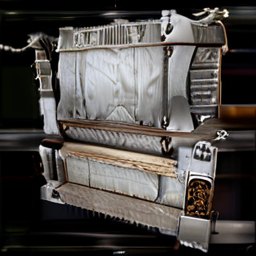
The Steampunk Structures Skin represents a significant addition to the architectural possibilities within ARK: Survival Evolved, introduced specifically through the "Bob's Tall Tales" DLC. This cosmetic item transforms the visual language of player-built bases, shifting them from a generic survivalist look to an intricate, industrial Victorian fantasy. Unlike standard skins that may be limited by resource tiers or map restrictions, this particular skin operates with universal compatibility regarding resource levels, allowing players to apply it to any structure regardless of the materials used to build it.
DLC Requirements and Acquisition
Access to the Steampunk aesthetic is not available to all players by default; it is strictly gated behind the "Bob's Tall Tales" adventure pack. Without owning this specific DLC, the skin cannot be equipped or utilized. Once the DLC is purchased and installed, the skin becomes accessible within the game's inventory system. Players can locate it directly in the "Cosmetics" tab. It is important to note that this item is a standalone cosmetic asset and does not require any specific resources to craft or purchase from in-game shops. The item has a stack size of one and weighs nothing, making it a lightweight addition to a player's inventory.
Application and Customization
Applying the Steampunk Structures Skin is a straightforward process designed for ease of use. Players must first ensure they have selected the DLC in their game settings. Once active, the skin can be accessed via the cosmetics menu or by placing it directly into a hotbar slot. To apply the skin, the player simply selects the item and targets the structures they wish to modify. The skin will then overlay the existing geometry, instantly altering the appearance of the base components.
A defining feature of this skin is its modular design, which allows for extensive customization without rebuilding structures. Users can switch between different modes of the skin by utilizing the slash key (/). This functionality enables players to toggle between specific subsets of the skin, such as focusing only on "Steampunk Structures" or switching to "Steampunk Seats," allowing for granular control over which parts of their base receive the thematic treatment.
Comprehensive Structure Compatibility
The "Steampunk Structures" mode offers an exhaustive list of compatible geometry, covering nearly every aspect of base building. The skin applies to Foundations, including Standard, Quarter, Triangle, and Quarter Triangle variants. Walls are fully supported across Standard, Quarter, Large, and Windowframe configurations. Doorways come in Standard, Short, Double, and Secret styles, while Doors cover a wide range from Standard and Cellar types to specialized Hangar and Barn doors.
Vertical elements are also thoroughly covered, including Windows, Ceilings (Standard and Quarter), Hatch Frames, and Trapdoors. Structural supports like Railings, Pillars (Standard, Half, Thin, and Thin Half), and Beams (Standard, Half, Thin, and Thin Half) can all be transformed. The skin extends to Sloped Walls (Standard and Shallow), Roofs (Standard, Quarter, Triangle, and Corners), Ramps (Standard, Quarter, and Corners), and Stairs (Standard and Quarter). Even complex assemblies like Staircases, Fence Foundations, Fence Supports, Ladders, and Gates (Standard and Behemoth) are compatible, ensuring a cohesive look throughout the entire build.
Specialized Seat Variants
Distinct from the structural elements, the skin includes a dedicated "Steampunk Seats" mode. This variant transforms seating arrangements to match the industrial theme. While the specific seat names are not listed in the primary text, the mode is designed to upgrade standard benches and chairs. Players can toggle this mode to apply the aesthetic to their relaxation areas, ensuring that even the furniture contributes to the immersive Steampunk atmosphere of their base.
Known Incompatibilities
Despite the vast compatibility list, there are specific structures that will not accept the Steampunk Structures Skin. Players should be aware of these limitations before attempting to apply the skin to their entire base. The skin explicitly does not work on Water Intakes and Taps. Additionally, platform structures built on natural terrain, such as Tree Platforms and Cliff Platforms, are incompatible. Attempting to apply the skin to these specific elements will yield no visual change, and players may need to rely on other cosmetic methods or leave these areas unskinned to maintain a realistic look.
Frequently asked questions
What does Steampunk Structures Skin eat?
A defining feature of this skin is its modular design, which allows for extensive customization without rebuilding structures. This functionality enables players to toggle between specific subsets of the skin, such as focusing only on "Steampunk Structures" or switching to "Steampunk Seats," allowing for granular control over which parts of their base receive the thematic...
Where does Steampunk Structures Skin spawn?
Unlike standard skins that may be limited by resource tiers or map restrictions, this particular skin operates with universal compatibility regarding resource levels, allowing players to apply it to any structure regardless of the materials used to build it.
What is Steampunk Structures Skin used for?
Unlike standard skins that may be limited by resource tiers or map restrictions, this particular skin operates with universal compatibility regarding resource levels, allowing players to apply it to any structure regardless of the materials used to build it. Applying the Steampunk Structures Skin is a straightforward process designed for ease of use.
Play on AncientARK
Join our ARK: Survival Ascended servers and put this guide into practice.
See the store